
Shopify Development Case Study
 How We Built a Shopify Product Builder for Custom Gaming PC Configuration
A real-world case study on transforming a complex, multi-component buying journey into a seamless, guided Shopify experience — built by DigiCloud for GamingPCWorld.
Platform: Shopify
Industry: Gaming Hardware
Solution: Custom Product Builder
Standard Shopify product pages are built for simplicity — a customer picks a size, a colour, or a material, and adds the item to their cart. That model works beautifully for thousands of stores. But what happens when a customer needs to configure a product step by step, choosing from hundreds of compatible components before a purchase makes sense?
That is the challenge GamingPCWorld faced. Customers arriving on their Shopify store wanted to build a complete custom gaming PC — selecting a processor, motherboard, memory, storage, cabinet, power supply, cooler, and graphics card — all in one structured, guided workflow. Standard Shopify variants and product pages could not support that experience out of the box.
Quick Answer: A Shopify Product Builder is a custom ecommerce solution that guides customers through a multi-step product configuration process before checkout. Businesses use Shopify Product Builders when their products require component selection, compatibility checks, or a step-by-step buying workflow that standard Shopify product pages cannot provide. GamingPCWorld needed one because building a gaming PC involves eight interdependent component categories, a catalog of hundreds of products, and real-time pricing — complexity that required a purpose-built solution.
DigiCloud designed and developed a fully custom Shopify Product Builder that replaced a fragmented browsing experience with an intuitive, step-by-step configuration workflow — making it easier for customers to build, price, and purchase a complete gaming PC directly on Shopify.
What Is a Shopify Product Builder?
A Shopify Product Builder is a custom-developed ecommerce tool that allows customers to configure a product through a guided, multi-step selection interface before adding it to their cart. Unlike standard Shopify product pages — which handle variants through dropdown menus — a product builder manages complex product relationships, compatibility logic, live pricing, and large catalogs through a structured workflow.
Standard Shopify supports up to three options per product with up to 100 variants per SKU. For simple products, this is more than sufficient. For businesses selling configurable products — where a customer must select multiple independent components before a purchase is complete — those constraints quickly become a barrier. This is where custom Shopify development becomes the right commercial decision.
A Shopify Product Builder removes that barrier by replacing the native variant model with a purpose-built configuration experience. Common use cases span a wide range of industries:
Computers & Electronics
Custom PC builds, laptops, servers, and audio equipment configured component by component.
Furniture & Home
Sofas, beds, and modular shelving where customers select dimensions, materials, and finishes.
Automotive Parts
Parts filtered by make, model, year, and trim to ensure compatibility before purchase.
Paint & Coatings
Custom colour mixing, finish selection, and volume configuration with live pricing.
Industrial Equipment
Machinery configured with specific power ratings, dimensions, attachments, and specifications.
Manufacturing
Custom fabricated components ordered through a guided specification workflow.
In each case, the core purpose is the same: replace a fragmented, confusing browsing experience with a structured process that helps customers configure exactly what they need — and purchase it confidently.
Why GamingPCWorld Needed a Shopify Product Builder
GamingPCWorld operated a large Shopify catalog spanning eight PC component categories — processors, motherboards, memory, storage drives, cabinets, power supplies, coolers, and graphics cards. Customers needed to select one product from each category to complete a valid build. Without a guided workflow, the buying process was fragmented, confusing, and prone to abandonment. Standard Shopify product pages could not structure this experience effectively.
The specific challenges GamingPCWorld brought to DigiCloud included:
A catalog spanning hundreds of individual products across eight categories
Customers had no efficient way to navigate, compare, or discover the right component for their build without an organised structure.
No guided buying workflow
Without step-by-step guidance, customers didn’t know which component to select next, leading to confusion and drop-off before checkout.
No live pricing visibility
Customers could not see a running total as they configured their build, making it difficult to manage budgets and increasing purchase hesitation.
No build tracking or summary
Customers had no way to review the components they had already selected, making it easy to lose track of progress mid-configuration.
Standard Shopify variants were not scalable
Shopify’s native 100-variant cap and three-option limit made it structurally impossible to represent a multi-category PC build through standard product pages.
The solution required custom Shopify development — a purpose-built product builder that guided customers through each component category in sequence, supported search and filtering at every step, tracked the build in real time, and calculated a live total price throughout the configuration process.
Designing the Shopify Product Builder Experience
The Shopify Product Builder interface was designed around a left-side configuration panel that presents each component category as a sequential step. Customers move through Processor, Motherboard, Memory, Storage, Cabinet, Power Supply, Cooler, and Graphics Card in a logical order. At each step, the right side of the screen displays the relevant product catalog — filtered, searchable, and sortable — so customers can find and select the right component without leaving the builder.
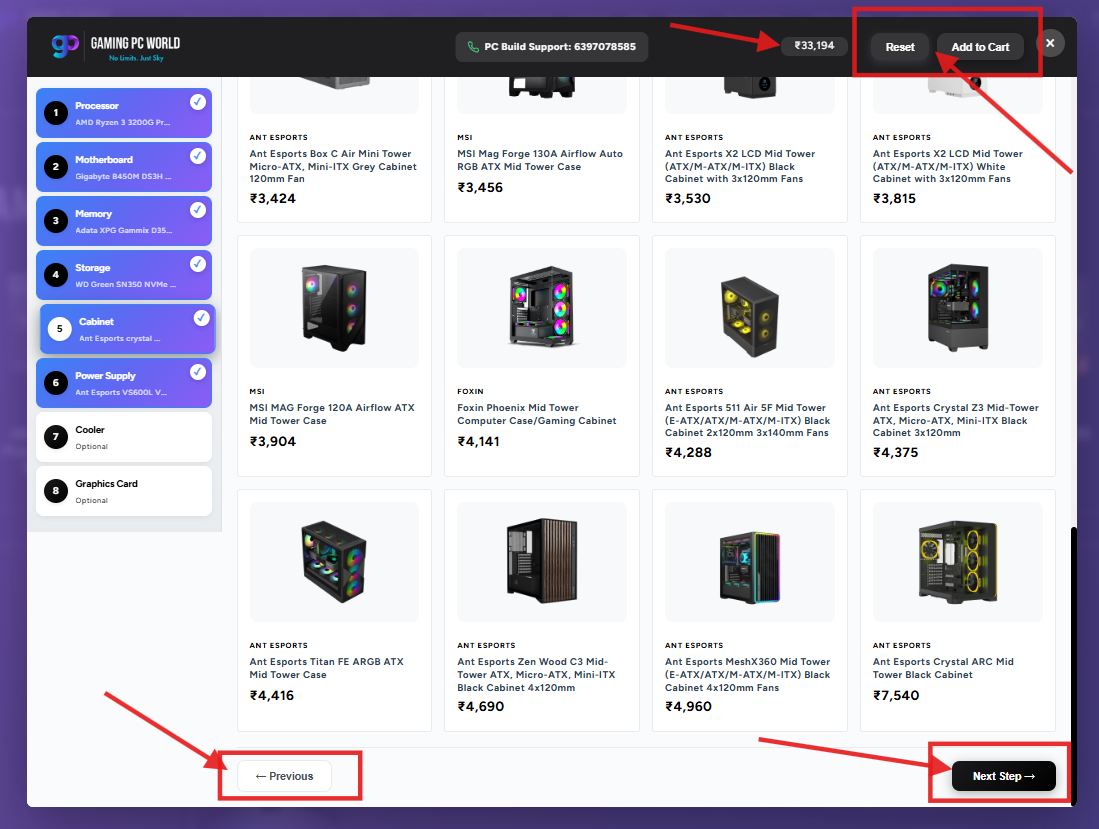
The interface was deliberately structured so that every decision point is clear and every step builds on the last. The left-side panel serves as both a navigation menu and a live progress tracker — showing customers exactly where they are in the build and what still needs to be selected.
Configuration Steps
This sequential structure reduces cognitive load significantly. Rather than confronting customers with hundreds of products at once, the builder narrows focus to one category at a time — eliminating the overwhelm that typically drives customers away from complex ecommerce catalogs. To understand the development layer that powers experiences like this, see our guide to Shopify Liquid Development.
Advanced Product Discovery Features
Within each configuration step, customers have access to a full product discovery toolkit — including keyword search, brand filtering, and price sorting — built directly into the builder interface. These tools allow customers to quickly locate the specific products they want without browsing an unstructured catalog, dramatically accelerating the time it takes to complete a build.
Real-Time Build Tracking and Component Selection
As customers select components, the Shopify Product Builder maintains a live build summary in the left-side panel. Each category shows either the selected component or a visual prompt indicating that a selection is still required. This persistent progress view ensures customers always know what they have chosen, what remains, and how far through the build they are — without needing to navigate away or scroll through previous selections.
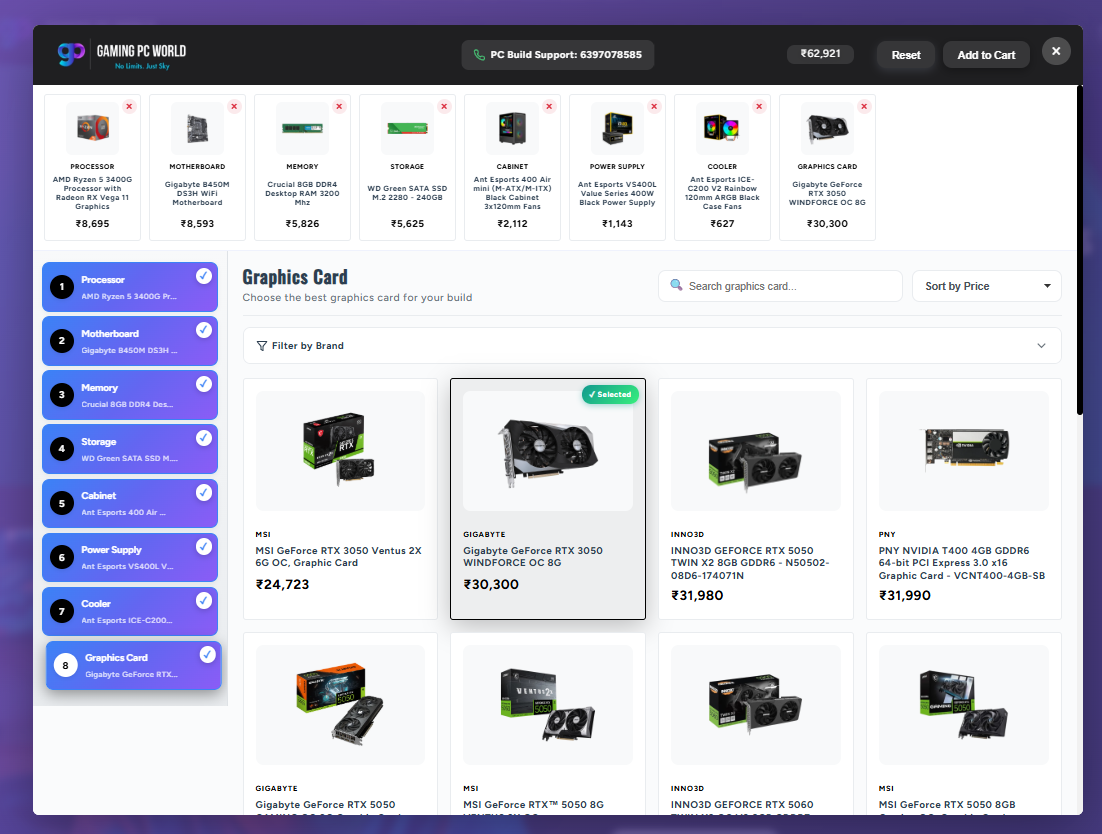
Build tracking addresses one of the most common usability failures in complex ecommerce: customers losing track of their progress. In a multi-category buying process, it is easy to forget which product was selected three steps ago. The builder’s left panel eliminates this problem by displaying every selected component persistently throughout the session.
Build Summary
A persistent panel listing every category and its current selection status — complete or awaiting input.
Component Tracking
Selected product names are shown against each category so customers can review their choices at any point.
Visual Indicators
Completed steps are visually distinguished from incomplete ones, giving customers an instant read on their build progress.
Edit Flexibility
Customers can jump back to any previous step to change a selection without losing the rest of their build.
Live Pricing and Build Management
The Shopify Product Builder displays a live running total that updates automatically each time a component is selected or changed. Customers can see the full cost of their build at every stage of configuration — not just at checkout. This pricing transparency reduces purchase hesitation, supports better budget decisions, and eliminates the unwanted surprises that often lead to cart abandonment.
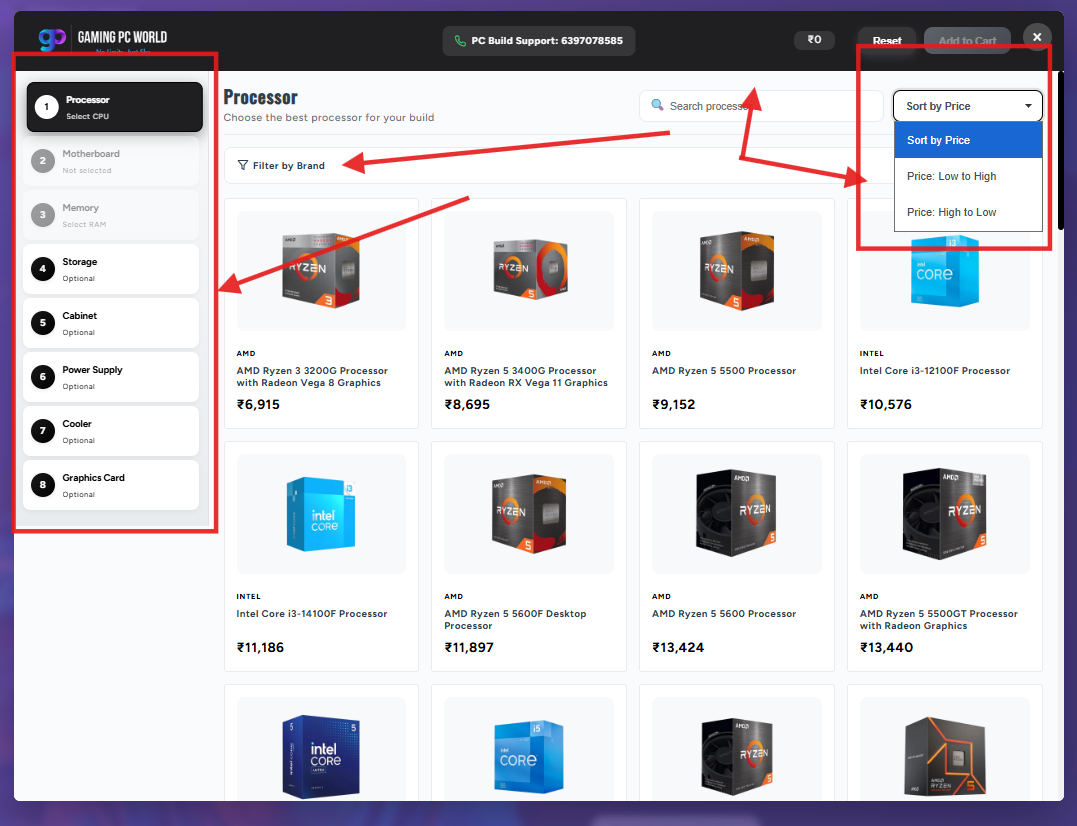
Live pricing is not a minor cosmetic feature — it is a fundamental trust mechanism in high-consideration purchases. When a customer is spending a significant sum assembling a custom PC, seeing an accurate total update in real time keeps them in control of their budget and increases their confidence in the buying decision.
Dynamic Pricing Engine
Every component price is pulled from the live Shopify product catalog. As customers add, change, or remove components, the total adjusts instantly — no page reloads, no manual calculations.
Add to Cart
When the build is complete, a single Add to Cart button adds all selected components to the Shopify cart simultaneously — turning an eight-step configuration into a single, clean checkout action.
Reset Selection
A Reset button allows customers to clear all selections and start a new build from scratch — a critical feature for customers who want to explore multiple configurations or who are purchasing on behalf of others.
Guided Navigation for Better User Experience
The Shopify Product Builder uses Previous and Next Step navigation buttons to move customers through each configuration stage in a logical sequence. This guided approach removes the ambiguity of open-ended browsing by telling customers exactly what to do next. The result is a structured buying experience that feels simple and purposeful — even when the underlying product catalog is complex.
Guided navigation is one of the most impactful UX decisions in complex ecommerce. When customers are given a clear path forward — rather than an open interface where they must decide what to do themselves — task completion rates increase significantly. The Previous and Next buttons accomplish three things:
✓
They reduce decision fatigue — customers only ever need to think about one component category at a time.
✓
They prevent skipped steps — the workflow ensures every required category is addressed before moving to checkout.
✓
They build confidence — customers feel supported by the interface rather than left to figure out a complex process alone.
The same guided navigation model that works for a PC builder applies equally to furniture configurators, auto parts selectors, industrial equipment specifiers, and any other Shopify ecommerce experience where customers must make multiple sequential decisions before completing a purchase. If you’re evaluating whether your store needs this kind of custom development, read our guide on how to get a Shopify store built for your business.
Technical Challenges Solved Through Custom Shopify Development
Building this Shopify Product Builder required DigiCloud to solve a set of ecommerce development challenges that go beyond standard Shopify theme customisation. These included managing product relationships across independent catalog categories, building real-time search and filtering logic within a guided interface, implementing dynamic pricing without page reloads, and creating a multi-item cart structure from a single configuration session.
The key development challenges and their business-value solutions included:
Shopify’s native variant system supports a maximum of 100 variants and three options per product. A gaming PC with eight component categories and hundreds of SKUs cannot be represented using native variants. The solution required an entirely custom product relationship architecture built outside the standard Shopify product model. Read our Shopify Development Services beginner’s guide for a deeper look at what’s possible on the platform.
Large Catalog Management
Displaying, filtering, and searching hundreds of products within a single page interface — without degrading performance — required custom catalog logic, efficient data fetching, and a product grid system built for speed and usability simultaneously.
Real-Time Search and Filtering
Search and brand filters needed to operate within each configuration step independently — filtering only the products relevant to the current category without resetting the broader builder state. This required careful state management across the full interface.
Dynamic Pricing Without Page Reloads
Live pricing required a custom pricing engine that could add, remove, or swap component prices in real time as customers interacted with the builder — all without a page refresh, which would have broken the user experience and lost session state.
Multi-Item Cart from a Single Session
The Add to Cart action needed to simultaneously add up to eight separate Shopify products to the cart as a single, logical purchase action — rather than requiring customers to add each component individually across eight product pages.
Business Benefits of a Shopify Product Builder
A Shopify Product Builder improves the buying experience for any business whose products require guided selection, component compatibility, or multi-step configuration. The business outcomes — including reduced confusion, faster purchasing decisions, higher basket values, and improved conversion opportunities — are consistent across industries from furniture to automotive parts to industrial supply.
The challenge GamingPCWorld faced is not unique to the gaming hardware industry. Any business with a large, configurable product catalog will recognise the same core problem. Here is how a Shopify Product Builder addresses those shared business challenges:
↑
Higher Average Order Value
When customers configure a complete product rather than buying a single item, average transaction values increase. A furniture store selling a sofa with fabric, frame, and leg options will see larger baskets than a store selling pre-configured sofas at fixed price points.
↓
Reduced Customer Confusion
Auto parts retailers know that a customer searching for brake pads without knowing their vehicle’s make, model, and year is a customer who is about to have a bad experience. A guided builder eliminates that problem by structuring the selection process logically from the start.
⚡
Faster Buying Decisions
Search, filtering, and sorting tools inside the builder reduce the time customers spend finding the right product. Industrial suppliers with thousands of SKUs benefit particularly — customers can locate exactly the specification they need without manually browsing an unstructured catalog.
🎯
Better Product Visibility
Paint and coatings retailers carry hundreds of colour and finish combinations. A product builder surfaces the right options at the right moment — preventing the situation where excellent products go undiscovered because the catalog is too large to browse effectively. For businesses managing large catalogs, our Matrixify Bulk Product Upload Service handles catalog operations at scale.
📈
Improved Conversion Opportunities
When the buying journey is clear and the next step is always obvious, customers are more likely to complete a purchase. Removing the friction that causes drop-off at the selection stage creates more opportunities for conversion at the checkout stage. See how store optimisation impacts revenue in our Shopify Store Optimization ROI breakdown.
🔧
Scalable Architecture
A properly built Shopify Product Builder scales with the catalog. As GamingPCWorld adds new CPUs, graphics cards, or storage options, the builder accommodates them without needing to restructure the interface or rebuild the underlying logic.
Feature Summary
| Feature | Purpose |
|---|---|
| Search Functionality | Quickly find products by name, keyword, or specification within any configuration step |
| Brand Filters | Narrow product choices to a preferred manufacturer or brand |
| Sorting Options | Compare products efficiently by price or relevance |
| Build Summary | Track all selected components in a persistent left-panel overview |
| Live Pricing | View a dynamically updated total build cost throughout the configuration |
| Previous & Next Navigation | Guide customers through each configuration step in a logical sequence |
| Add to Cart | Add all selected components to the Shopify cart in a single action |
| Reset Selection | Clear all selections and restart the configuration from scratch |
Project Snapshot
Client
GamingPCWorld
Industry
Gaming Hardware & Custom PCs
Platform
Shopify
Solution
Custom Shopify Product Builder
Key Features Delivered:
Brand Filters
Price Sorting
Live Build Summary
Dynamic Live Pricing
Guided Step Navigation
Add to Cart
Reset Build
Business Goal
Create a streamlined, guided PC configuration and purchasing experience that turns a complex multi-component buying process into a simple, confident, single-session purchase on Shopify.
Frequently Asked Questions
When Standard Shopify Functionality Is Not Enough
Standard Shopify functionality is well-suited for straightforward ecommerce — a customer selects a product, picks a size or colour, and checks out. It becomes insufficient when products require multiple configuration decisions, involve large catalogs across multiple categories, or demand guided buying experiences that out-of-the-box Shopify cannot provide. In those cases, custom Shopify development is the right path forward — and DigiCloud’s team has delivered it for 500+ businesses over 11+ years.
The following scenarios consistently indicate that custom Shopify development — including a Shopify Product Builder — is the right path forward:
→
Complex product configuration
Products that require customers to make more than three sequential choices — such as a gaming PC, a modular sofa, or a custom industrial machine — exceed what standard Shopify variants can handle.
→
Thousands of product options
When a catalog has hundreds or thousands of SKUs, customers need structured navigation tools — search, filtering, and sorting — built directly into the buying workflow to find the right product efficiently.
→
Product compatibility requirements
When certain products only work correctly with specific other products — as is common in automotive parts, electronics, and industrial equipment — the buying interface needs to enforce or guide compatibility, which requires custom logic beyond standard Shopify.
→
Guided buying workflows
High-consideration purchases where customers benefit from a structured, step-by-step experience — rather than free-form browsing — require a guided interface that standard Shopify product pages are not designed to provide. Our post on what every Shopify store setup service should tell you covers how to identify when custom development is the right call.
→
Dynamic pricing requirements
When the total purchase price depends on which combination of products a customer selects — and that total needs to be visible throughout the buying process — a custom pricing engine is required, as Shopify does not support this natively across multiple independent products.
Key Takeaways
🧩
Shopify Product Builders simplify complex purchases by breaking them into guided, manageable steps.
🗺️
Guided workflows reduce decision fatigue and keep customers moving toward checkout with confidence.
🔍
Search and filtering built into the builder accelerate product discovery across large catalogs.
💰
Live pricing removes budget uncertainty and builds purchase confidence throughout the configuration.
🏭
Product builders work across industries — from gaming hardware to furniture, auto parts, and industrial supply.
⚙️
Custom development overcomes Shopify’s native variant and catalog limitations when the business demands it.
📊
Better buying experiences create more conversion opportunities — particularly in high-consideration, multi-component purchases.
Conclusion
GamingPCWorld’s challenge was not unusual. Businesses across dozens of industries face the same fundamental problem: their products are configurable, their catalogs are large, and their customers need structured guidance to reach a confident purchase decision. Standard Shopify product pages — designed for simple, single-item purchases — are not built for that reality.
DigiCloud transformed GamingPCWorld’s purchasing journey by building a custom Shopify Product Builder that replaced fragmented browsing with a structured, guided configuration experience. Eight component categories. Real-time search and filtering. A persistent build summary. Dynamic live pricing. And a single Add to Cart action that completes the purchase — cleanly, confidently, and on Shopify.
The broader lesson is this: when your product complexity, catalog scale, or buying journey requirements exceed what standard Shopify can deliver, custom development is not just an option — it is the right commercial decision. The investment in a Shopify Product Builder is an investment in removing the barriers between a customer who is ready to buy and a purchase that is ready to be made.
📚 Related Reading from DigiCloud
- →
Shopify Development Services — A Beginner’s Complete Guide - →
Shopify Theme Customization: From Default Theme to a Store That Actually Converts - →
Shopify Liquid Development Guide: What Business Owners Need to Know - →
Shopify Store Optimization ROI: Revenue You’re Losing Every Month - →
How Do I Get a Shopify Store Built for My Business? - →
Matrixify Bulk Product Upload Service for Shopify - →
We Built 400+ Stores — What Every Shopify Store Setup Service Should Tell You
Work With DigiCloud
Building Something That Standard Shopify Can’t Handle?
DigiCloud specialises in custom Shopify development for businesses with complex products, large catalogs, and buying journeys that go beyond what standard Shopify themes and apps can support.
Product Configuration Systems
Advanced Filtering & Search
Custom Shopify Development
Ecommerce Development Solutions
Talk to DigiCloud About Your Project
11+ years of Shopify & ecommerce development experience